A Publisher alternative for churches
For the church office that prints a bulletin every weekUpdated ~/publisher-alternative-for-churches
Your bulletins, newsletters and flyers can carry on as they are. Microsoft is retiring Publisher, but your .pub files are fine. PubStudio opens them on the church office PC, keeps their layout, and prints them the way you're used to. Opening, editing and printing are free, for good.
 No Windows warning
On a Mac, a Chromebook or a PC where you can't install apps? Open PubStudio online in Chrome or Edge, free.
What Publisher's retirement means for a church office
Many church offices have years of work in Publisher: the weekly bulletin, the monthly newsletter, Advent and Easter services, event flyers, name badges and mailing labels. Microsoft ended support for Publisher in October 2026 and is taking it out of Microsoft 365. Its notice to IT admins says the update that removes it reaches PCs from mid-November 2026, and some not until early December.
Your files aren't lost. Only the app goes. If it has already vanished from your PC, see Publisher disappeared from my PC.
Open the bulletins you already have
- Install PubStudio from the Microsoft Store, or open it online.
- Open last Sunday's .pub bulletin. Its text, pictures, tables and pages come in where you left them. Files from Publisher 98 through Microsoft 365 open.
- Change the date, readings and hymns, and print. Your original file is never changed: saving makes a PubStudio copy next to it.
With Pro, Design > Next Issue does the first part for you. It makes a copy for next Sunday with the dates moved on a week. It lists each change first, so you can untick any you'd rather make by hand. It works for the monthly newsletter too, where it also counts up the issue number and turns the calendar to the new month.
Templates for what a church prints
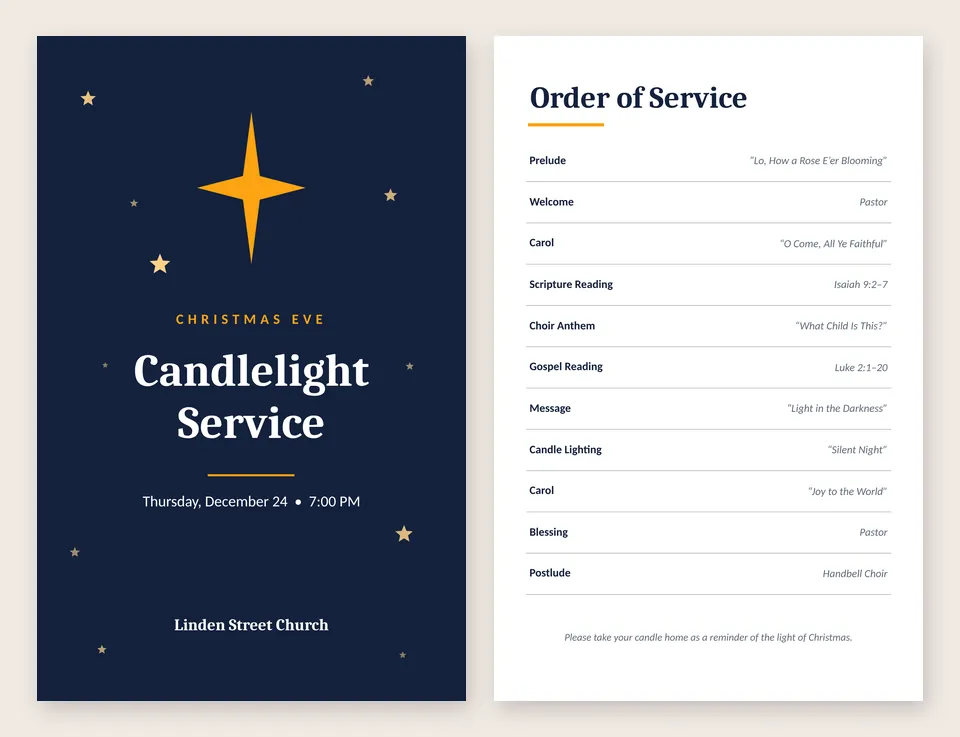
- Bulletins: the Christmas Service Bulletin folds into a half-letter booklet, and Event Program works the same way for any service.
- Newsletters with a masthead, a lead story and a sidebar for dates. See newsletter templates.
- Flyers and posters for the potluck, the rummage sale and Vacation Bible School. See flyer templates.
- Calendars for the month's services and events. See calendar templates.
- Name badges, labels and certificates for volunteers, visitors and confirmation classes.
Pro adds new designs every month. November's include an Advent Worship Bulletin, a Thanksgiving Potluck Flyer, a Winter Coat Drive Flyer and a Cookie Exchange Invitation.
Mailing labels and letters
Mail merge prints a letter, postcard or label for everyone on a list, from an Excel or CSV file, Access or Outlook contacts. Use it for the newsletter's mailing labels, year-end letters that greet each person by name, or name badges for a retreat. Mail merge is part of Pro, and the guide walks through address labels step by step.
A plain sheet of the same label, like your church's return address, is free. See print Avery labels.
Every computer in the church office
- The office PC: install from the Microsoft Store. Windows shows no warning, and updates come through the Store.
- The pastor's Mac, a volunteer's Chromebook, or a PC you can't install apps on: PubStudio online runs in Chrome or Edge with nothing to install. Your file is opened in the browser and isn't uploaded.
- Years of old bulletins: Pro can convert a whole folder of .pub files to PDFs in one go, so you have an archive anyone can open.
Free or Pro?
| Free, for good | Open, edit, print and save any publication, including your old .pub files, with one template of each kind. Prints and PDFs carry a "Made with PubStudio" line. |
|---|---|
| Pro, $10 a month or $99 a year | Clean prints and PDFs, mail merge, every template plus new designs each month, Next Issue, a Brand Kit for your church's logo, colors and fonts, QR codes for your website or giving page, more export types, and converting a whole folder at once. |
Every new PC gets a 7-day Pro trial, with no card or account. If you stop paying, PubStudio goes back to Free and every bulletin still opens.
More than one PC in the office? Choose how many at checkout, from 1 to 99. Each PC is $10 a month or $99 a year, and a Pro license also works online. If your church pays by invoice or purchase order, email us at [email protected] and we'll send you an invoice for the yearly plan. See pricing.
Also for schools, libraries and nonprofits. More on switching: Moving from Publisher · Publisher is retiring