Convert a whole folder of .pub files to PDF
Your whole Publisher archive in one go, on your own PCUpdated ~/batch-convert-pub-to-pdf
Years of bulletins, newsletters and forms, converted in one go. Publisher is retiring, and most offices have folders full of .pub files. PubStudio Pro turns every .pub file in a folder, and in the folders inside it, into PDFs. Nothing is uploaded, and your original files aren't changed.
 No Windows warning
How do I convert a whole folder of .pub files?
- Install PubStudio on Windows 10 or 11. Every new PC gets a 7-day Pro trial, with no card or account.
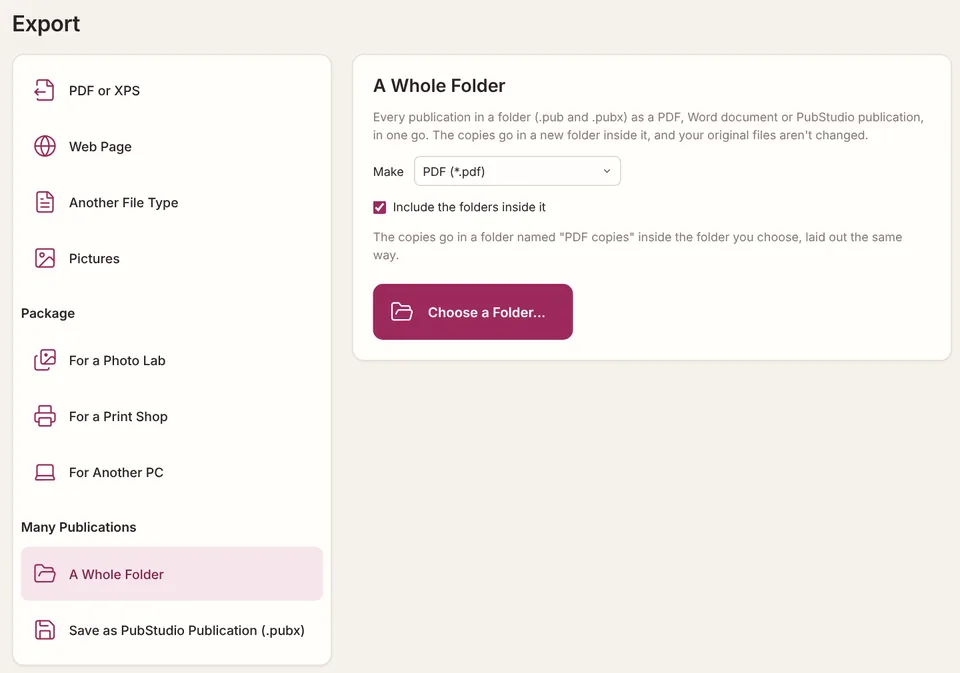
- Go to File > Export > A Whole Folder.
- Choose what to make: PDFs, Word documents, or PubStudio publications you can keep editing. Leave "Include the folders inside it" ticked to take in every folder below the one you pick.
- Choose a Folder. PubStudio works through every .pub and .pubx file in it. The copies go in a new folder inside it, such as "PDF copies", laid out the same way as your originals.
- Check the list at the end. If a file can't be converted, for example because it's damaged, PubStudio carries on with the rest and tells you which ones to look at.
PDF, Word or PubStudio?
- PDF for files you only need to keep, read and print. PDFs open anywhere, keep the layout and pictures, and their text can be searched.
- Word for text you want to reuse in a letter or report.
- PubStudio publications for files you'll keep changing, like a weekly bulletin or a price list.
Who it's for
- Church and school offices with years of bulletins, newsletters and programs.
- IT people moving a client's shared drive off Publisher before it's gone.
- Anyone who would rather not open hundreds of files one at a time.
How much does it cost?
Converting a whole folder is part of PubStudio Pro: $10 a month or $99 a year, and you can cancel any time. If you only need to convert an archive once, a single month covers it. Pro PDFs also come without the "Made with PubStudio" note that the free version adds.
Converting a whole folder needs the Windows app. PubStudio online converts one file at a time, and the free version does one file at a time too: see convert a .pub file to PDF.