Convert a .pub file to PDF
Without Publisher, and without uploading your file~/convert-pub-to-pdf
Your .pub file stays on your PC. Online converters upload your publication to someone else's server. PubStudio opens it on your own computer, shows you exactly how it looks, and saves the PDF next to it. It's free, and you don't need an account.
How to do it
- Install PubStudio on Windows 10 or 11. It's free to download, with no sign-in. If Windows shows a warning, the download page explains it.
- Open your .pub file: File > Open, or drag it onto the PubStudio window. Files from Publisher 98 through Microsoft 365 open with their text, pictures, shapes, tables and pages.
- Check it. Fix anything you want to change first: it's a full publishing app, not just a viewer. Your original .pub file is never changed.
- Make the PDF: File > Export > PDF or XPS. Choose the quality: Standard for email and home printing, High quality printing for office printers and copy shops.
- Save. The PDF keeps the layout, fonts and pictures, and its text stays real, so it can be searched and copied.
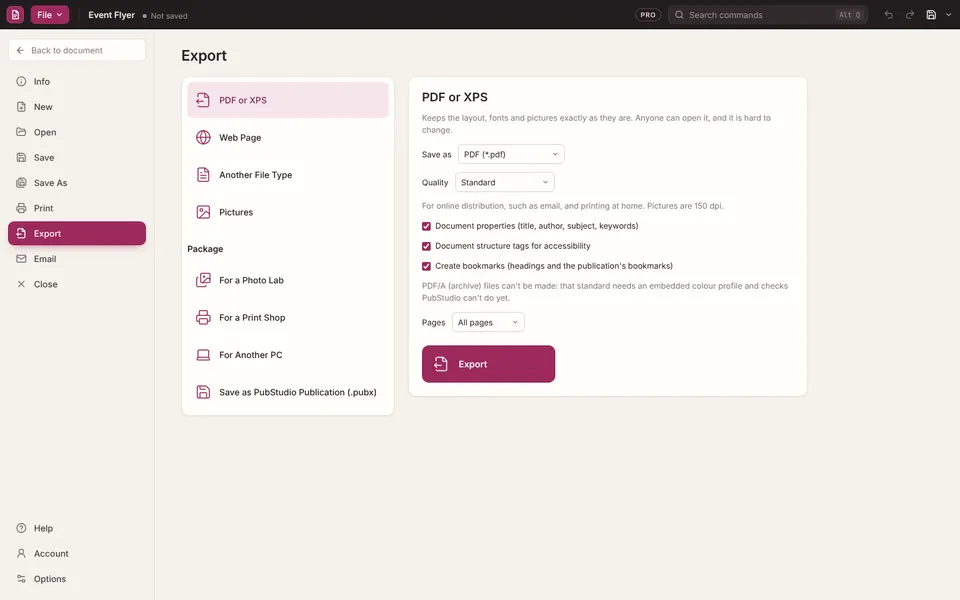
The free version puts a small "Made with PubStudio" note at the foot of each page. PubStudio Pro makes PDFs without it, plus press-ready PDFs with bleed and crop marks for a print shop.
Questions
Do I need Publisher installed?
No. PubStudio reads .pub files itself, so it works on PCs that never had Publisher, and after Publisher is gone.
Is my file uploaded anywhere?
No. Everything happens on your PC. PubStudio has no account and no tracking, and it never uploads your files. See privacy.
Does it change my .pub file?
No. The original stays exactly as it was. If you edit before exporting and save, PubStudio saves a separate .pubx copy.
Can I convert to Word or pictures instead?
Yes, with Pro: File > Export also makes Word, RTF, PNG, JPEG and other pictures, web pages and more. See the guide.
What if my file doesn't look right?
Click "Looks wrong? Send it to us" at the top of the window. It starts an email to support with your file attached, so we can fix how it opens. Nothing is sent until you press Send.
Moving everything over? See Moving from Publisher.