Open a .pub file without Publisher
View, edit and print it on your own PC~/open-pub-file
A .pub file is a Microsoft Publisher publication. With Publisher going away, PubStudio opens them on Windows 10 and 11 with their text, pictures, shapes, tables and pages where you left them. It's free, there's no account, and your file never leaves your PC.
How to open it
- Install PubStudio on Windows 10 or 11. If Windows shows a warning, the download page explains it.
- Open the file: File > Open, or drag the .pub file onto the PubStudio window. Files from Publisher 98 through Microsoft 365 open.
- Look it over. Every page is listed in the pages pane down the side, with its page size, master pages and colours.
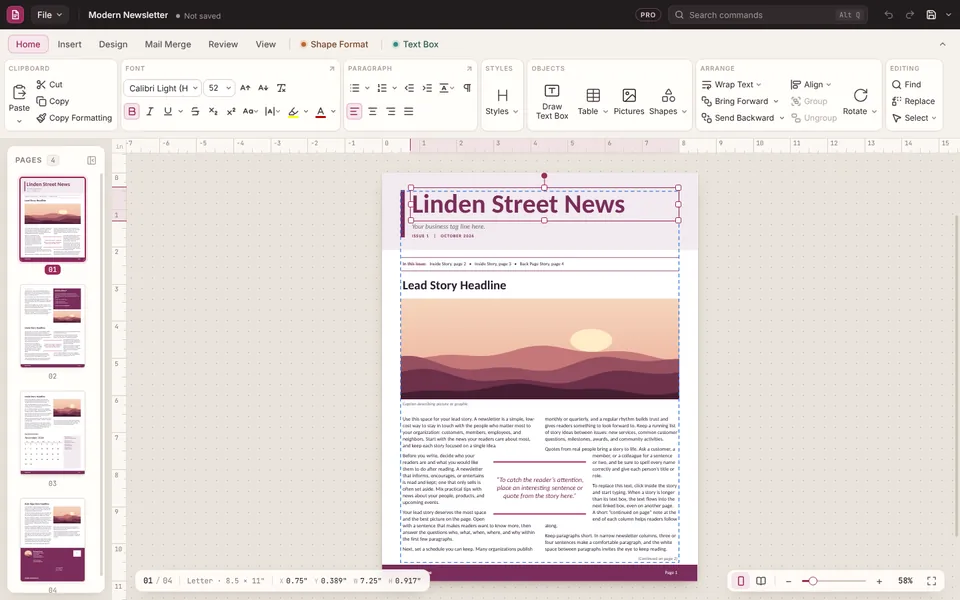
Then edit, print or share it
- Edit it like you used to: change the text, swap pictures, move things around, add pages. It's a full publishing app, not just a viewer.
- Print it with a live preview, including booklets, labels and folded cards.
- Make a PDF anyone can open. See convert a .pub file to PDF.
- Keep working on it. Save makes a PubStudio copy (.pubx) next to it. Your original .pub file is never changed.
If something doesn't look right
Publisher's files have a lot of corners. If one comes in looking different, click "Looks wrong? Send it to us" at the top of the window. It starts an email to support with the file attached, so we can fix how it opens. Nothing is sent until you press Send.
Moving everything over? See Moving from Publisher and what Publisher's retirement means for your files.